
TL;DR
Java4Shell (CVE-2026-114938) is a memory-corruption flaw in OpenJDK’s Base64 decoder, disclosed by Calif.io on November 17, 2026. On the right hardware, an unauthenticated attacker can overflow the JVM heap with a string as simple as 64 A characters and a trailing =, and turn it into remote code execution — before your application logic ever runs. Calif reports pre-auth RCE across six major products. Patch your Java runtime now: 17.0.21.1, 21.0.13.1, 25.0.5.1, 27.0.1.1, or the Java 8 Enterprise Performance Pack 8u513-perf. This post explains the bug accurately, shows what post-exploitation looks like on a Tomcat-hosted app in a lab, and demonstrates where file integrity monitoring — the discipline behind CimTrak — catches the attacker’s next move and reverses it.
What just happened
On November 17, 2026, researchers at Calif.io disclosed Java4Shell: a critical memory-corruption vulnerability, CVE-2026-114938, in the part of OpenJDK that decodes Base64. Base64 is everywhere in a modern Java stack — JSON Web Tokens, SAML assertions, session cookies, basic-auth headers, API payloads — so the decoder sits on the unauthenticated attack surface of almost every Java web application.
The unsettling part is how little it takes to reach the bug. The canonical trigger is 64 A characters followed by a single =. That one short string, decoded on a vulnerable runtime, writes past the end of a heap buffer and corrupts whatever Java objects happen to sit next to it. In Calif’s initial testing, that was enough to reach pre-auth RCE in widely deployed server software — spanning identity, CI/CD, artifact, and collaboration tools — with more products behind each app’s own exploit.
There is an important nuance in the scoring, and an honest post has to lead with it:
|
CVE |
CVE-2026-114938 |
|
Severity |
9.2 Critical (Calif, CVSS 4.0) — 8.1 High (Oracle, CVSS 3.1, AV:N/AC:H/PR:N/UI:N/S:U/C:H/I:H/A:H) |
|
Access required |
None — unauthenticated, network-reachable |
|
Trigger |
A crafted Base64 string (e.g. 64× “A” + “=”; 128× “A” + “=” on JDK 17) |
|
Affected software |
OpenJDK 17.0.6+ (17, 21, 25, 27) and the Java 8 Enterprise Performance Pack |
|
Affected hardware |
Only x86-64 CPUs with AVX-512 VBMI; ARM64 is not affected |
|
Fixed in |
17.0.21.1, 21.0.13.1, 25.0.5.1, 27.0.1.1, 8u513-perf |
|
In the wild |
No confirmed exploitation and not in CISA’s KEV as of Nov 17; trigger PoC public, weaponized exploits held back |
Oracle’s own CVE record calls it a “difficult to exploit vulnerability” that nonetheless lets an unauthenticated attacker achieve full takeover. Both things are true at once, and that tension is the whole story: hard to weaponize reliably, trivial to reach, and catastrophic when it lands.
How Java4Shell actually works
The bug lives in a JIT intrinsic — a hand-written assembly routine the HotSpot C2 compiler swaps in for the pure-Java Base64 decoder to make it fast. On x86-64 chips that support the AVX-512 VBMI instruction set, that routine decodes 64 bytes at a time using masked vector stores (VMOVDQU8 / evmovdqub), where a 64-bit write mask decides which of the 64 output bytes actually get written.
Handling the trailing “=” padding is where it breaks. As Calif describes it, the intrinsic miscalculates the padded tail’s store mask. The code decrements the output length as it accounts for padding, and when that length reaches zero it underflows to -1 or -2. The step that is supposed to zero out the unused mask bits then leaves the mask as all ones — so the routine writes all 64 bytes instead of the two or three it should.
Walk the canonical example through it:
- 64 A characters plus one = is a 65-byte input.
- The decoder allocates a 50-byte output array for the result.
- The masked store begins writing at offset 48 and runs 62 bytes past the end of that array.
That is a heap buffer overflow. The write lands in adjacent JVM objects and corrupts them. Java notices the malformed input a moment later and throws IllegalArgumentException, but by then the damage on the heap is done. The attacker doesn’t control the bytes being written — offsets 48 through 63 always get the value 0x9a — only where the write lands, which is enough to groom the heap toward code execution. Calif also describes an information-disclosure path they nicknamed “JavaBleed,” a Heartbleed-style leak of adjacent memory (keys, tokens) as an intermediate step.
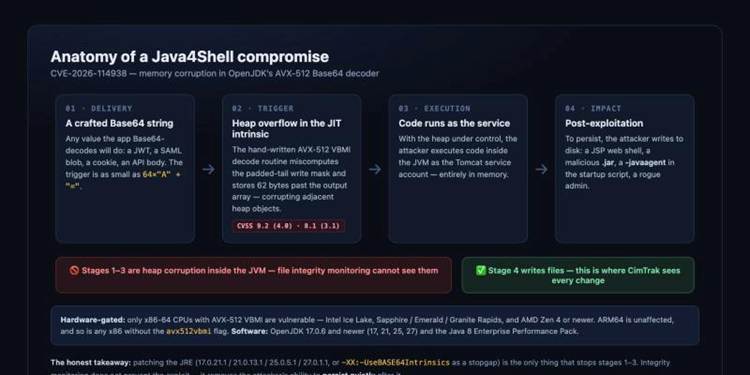
Figure 1 — Anatomy of a Java4Shell compromise. Stages 1–3 are heap corruption inside the JVM and invisible to file integrity monitoring; stage 4 writes files and is fully visible.
Two properties make this one genuinely strange:
- It’s hardware-gated. The vulnerable code only runs on x86-64 CPUs that advertise AVX-512 VBMI — Intel Ice Lake and the Sapphire / Emerald / Granite Rapids Xeons, and AMD Zen 4 or newer. ARM64 is untouched, and so is any older x86 without the avx512vbmi flag. The exact same JDK build is exploitable on one server and inert on the one next to it, depending on the silicon.
- It’s new code. OpenJDK 17.0.0 through 17.0.5 are not affected; the vulnerable AVX-512 Base64 intrinsic (OpenJDK enhancement JDK-8268276) was backported into the Java 17 line in late 2022 and first shipped in 17.0.6. Standard Java 8 and 11 don’t carry it — the one reason a “Java 8” build turns up on the fix list is the Java 8 Enterprise Performance Pack, which deliberately backports these JDK 17 optimizations into a Java 8 distribution. This is a bug in an optimization, not in Java’s decades-old Base64 logic.
And here is the part that matters for defenders, the same honest center as every memory-corruption story: stages 1 through 3 happen entirely inside the JVM’s heap. Nothing touches the disk. No file integrity tool can see the overflow, the groom, or the in-memory code execution. The only thing that stops those stages is patching the runtime. So why are we here? Because stage 4 is where the attacker makes it stick.
The attacker’s real goal is stage 4
Code execution inside a JVM is powerful but fragile — restart the service and it’s gone. To turn a single successful overflow into a durable compromise, the attacker writes to disk. A huge share of enterprise Java runs as a WAR on Apache Tomcat — think of open-source staples like Apache Guacamole, Apache Solr, or Alfresco, alongside countless in-house apps. On a Tomcat-hosted application, durable persistence looks like:
- A JSP web shell dropped into the live web application for reliable re-entry.
- A malicious JAR planted on the server classpath so it loads into every app.
- A -javaagent added to the startup script, giving the attacker code on every single boot.
- A rogue administrator injected into the server’s user realm.
- A Groovy hook of the kind many Java app add-ons execute.
Every one of those is a file write, and a file write against a known-good baseline is exactly what integrity monitoring exists to catch. To show it on real paths, I built a lab.
|
About the lab. The demonstration below does not exploit CVE-2026-114938 and contains no memory-corruption or exploit code for it — Calif is deliberately holding weaponized exploits back, and so am I. Instead, the lab simulates what an attacker does after they already have code execution inside the JVM: it writes the files a real intruder writes. That’s the stage integrity monitoring is designed to catch, so it’s the honest thing to measure. The target is a stock Apache Tomcat install, the servlet container that hosts a large share of enterprise Java web apps. The simulation script is the one you’d hand to an engineer to run on a box where CimTrak is already watching the install directory, so the events below show up in your own console. |
Impact: a Tomcat app in the lab
The target is a clean Tomcat 10.1 install — 634 files. After simulating the post-exploitation stage, the attacker’s JSP web shell answers from the live web root, running commands as the service account:
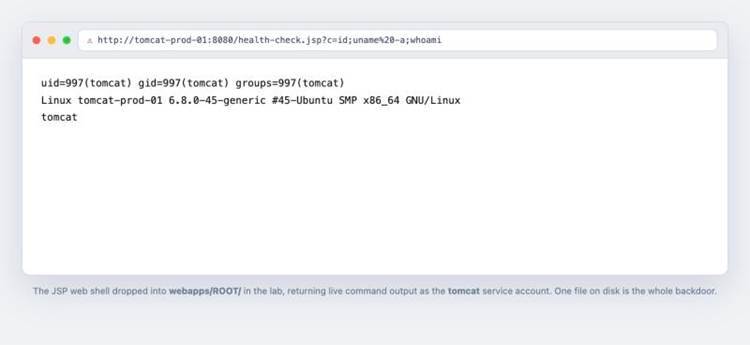
Figure 2 — The JSP web shell dropped into the Tomcat web root in the lab, returning live command output as the tomcat service account.
Behind that one request, six changes landed on disk:
- webapps/ROOT/health-check.jsp — the web shell, hidden behind an innocuous name.
- lib/catalina-metrics.jar — a malicious library on the shared server classpath.
- bin/setenv.sh — a new startup file that attaches a -javaagent on every boot.
- scripts/onstart.groovy — a persistence hook of the kind an add-on would run.
- conf/tomcat-users.xml — a rogue manager-gui / admin-gui administrator.
- conf/server.xml — a quiet connector edit to ease later access.
None of these would trip a signature scanner looking for known-bad hashes — the payloads are bespoke. What they can’t hide from is a system that knows exactly what every file in that install is supposed to be.
Where CimTrak comes in: detection
CimTrak’s model is change, measured against a trusted baseline, in real time. You establish an authoritative snapshot of a system’s files — hashes, sizes, permissions — and from then on any deviation that doesn’t match an approved change ticket is flagged the instant it happens, with the file, the operation, and the responsible process attached.
To demonstrate that faithfully, the lab runs a minimal integrity monitor that works the same way in principle: baseline, then detect drift. Here is the real output from the lab after the simulated intrusion — not a mockup:
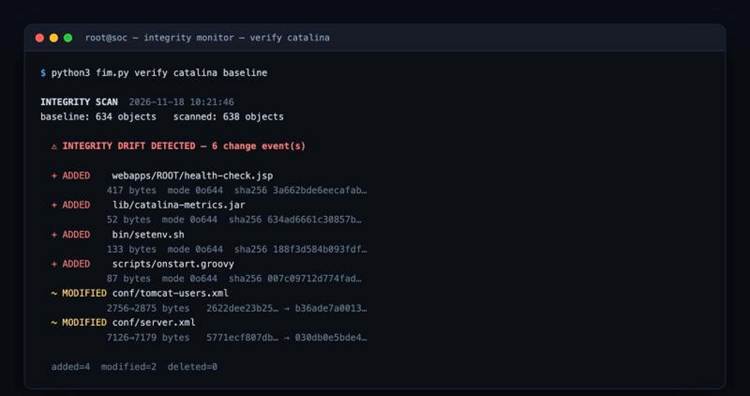
Figure 3 — Real integrity-scan output: 6 change events (4 added, 2 modified), each with before/after SHA-256 fingerprints.
Six events. Four added, two modified, zero false positives, each with its before-and-after SHA-256 fingerprint. The JSP web shell is called out as plainly as the tampered tomcat-users.xml.
In a production CimTrak deployment, those same six events surface in the console with severity, the responsible user and process, and one-click response actions. Here’s an illustration of how that change event would present:
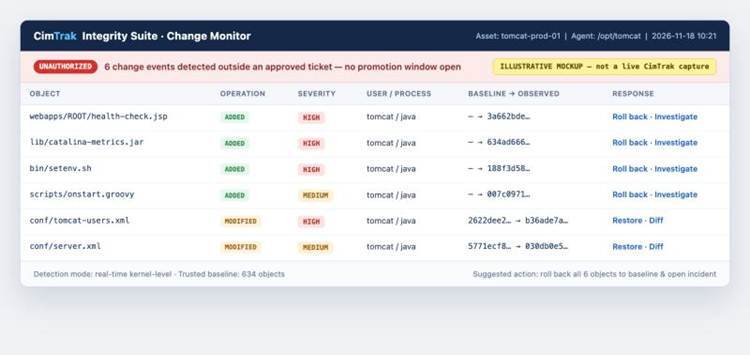
Figure 4 — Illustrative mockup of a CimTrak change-monitor console (not a live capture). Replace with a real screenshot before publishing.
(That console image is an illustrative mockup, not a live CimTrak screen capture — swap in a real capture from your own environment before publishing. The terminal output above it is genuine lab output.)
The point for a Java4Shell scenario: the exploit itself was invisible, happening in heap memory that no file monitor can observe. But the attacker’s first durable action — the web shell, the agent, the rogue admin — was not. Integrity monitoring collapses dwell time from “until someone notices” to “the instant the web shell hit disk.”
Recovery: rolling back to known-good
Detection is half the value; getting clean again fast is the other half. Because the baseline stored a trusted copy of every file, recovery is deterministic — remove what the attacker added, restore what they changed, re-verify:
[BASELINE RESTORED]
removed unauthorized files : 4
restored trusted files : 2
INTEGRITY SCAN 2026-11-18 10:21:52
baseline: 634 objects scanned: 634 objects
✓ NO DRIFT — all objects match the trusted baseline
Instead of rebuilding the host and hoping you found every backdoor the attacker scattered across webapps/, lib/, bin/, and conf/, you roll the file system back to a cryptographically verified good state and know nothing was left behind.
The limits — stated plainly
A vendor post that only lists wins isn’t worth your time, so here’s the boundary:
- Integrity monitoring does not prevent Java4Shell. Only patching the JRE does. If you take one thing from this post, it’s “update Java today.”
- It cannot see the overflow. The corruption, the heap groom, and in-memory code execution happen inside the JVM and leave no file-level trace. The “JavaBleed” memory-leak path can steal secrets without ever writing a file. Pair integrity monitoring with runtime and network detection for that.
- Restoring files does not un-steal data. If tokens or credentials were leaked during the window, rolling back tomcat-users.xml fixes the backdoor, not the breach. Rotate secrets and assume exposure.
Within those limits the value is real and specific: for the overwhelmingly common case where an attacker converts code execution into on-disk persistence, integrity monitoring turns a silent compromise into a timestamped, attributable, reversible event.
What to do this week
- Patch the Java runtime to 17.0.21.1, 21.0.13.1, 25.0.5.1, 27.0.1.1, or 8u513-perf — and remember that bundled JREs count. Many enterprise apps ship their own Java; update the runtime each one actually uses, then restart the service so the new build is live.
- Triage by hardware. If a host’s CPU lacks avx512vbmi (check /proc/cpuinfo), it isn’t exploitable for RCE and can be scheduled rather than rushed. Prioritize the Ice Lake / Sapphire-Rapids / Zen 4+ fleet.
- Use the stopgap only if you can’t patch now. -XX:-UseBASE64Intrinsics disables the vulnerable fast path; -XX:UseAVX=2 disables AVX-512 on x86-64 (it breaks Java on ARM). Neither is Oracle-endorsed, and both carry a performance cost. They buy time; they are not the fix.
- Assume the window mattered. For internet-facing Java apps on vulnerable hardware, hunt now for JSP web shells, unexpected JARs, new -javaagent flags, and rogue admin accounts.
- Baseline your app servers. Whether with CimTrak or otherwise, establish a trusted baseline of each install root now so the next post-exploitation file write is loud instead of silent, and rotate any secrets a compromised JVM could have leaked.
Patching stops the exploit. Knowing the moment anything on disk changes — and being able to put it back — is how you make sure a missed runtime on one AVX-512 box doesn’t quietly become a resident attacker.
Sources
- Java4Shell — Calif.io (original disclosure)
- CVE-2026-114938 — CVE Record (Oracle CNA)
- Java4Shell (CVE-2026-114938): Frequently Asked Questions — Tenable
- Java4Shell: Vulnerability in OpenJDK Enables RCE on AVX-512 CPUs — SentinelOne
- Java4Shell Enables Pre-Auth RCE in Multiple Enterprise Products — The Hacker News
- How to Find, Mitigate, and Patch the Critical Java4Shell Flaw — Qualys
The lab in this post simulates post-exploitation file activity only; it does not exploit CVE-2026-114938.